Staying safe: reporting, and what Warden does
What happens when you report something, what you'll hear back, and the filters and presets every server owner can switch on.
 Kaisuki Team3 min read
Most of Kaisuki is people being kind to each other. For the rest there are two tools: reporting, which anyone can use, and Warden, for the people who run servers.
Reporting something
You can report a message, a DM, a post, a comment, a profile or a whole server. Open its menu and choose Report.
- Pick what it is: spam, harassment, hate speech, violence, NSFW content, impersonation, self harm, illegal activity, or something else.
- Say what happened. Where, when, what was said. Links help.
- Block them in the same step if you want to. For some kinds of report that switch starts on.
They are never told who reported them.
Copyright works differently. It's a formal notice with its own form, and choosing it takes you there.
Inside a server, you can also type /report, a name and a reason to tell that server's own moderators, privately.
What you hear back
A note lands in your inbox straight away: We received your report. Our moderation team reviews it, and if we act on the account, we message you to say so. We aim to reply within one business day.
If we ever act on your account, you get a notice that says what happened, which rule it was about and when it lifts, with a way to appeal.
Warden
Every server has Warden, its built-in moderation app, with nothing to invite and nothing to set up. Server owners find it in Server Settings. Its filters act the moment a message is sent:
- blocked words and patterns
- spam: too many messages too fast, the same message over and over, mass mentions, emoji spam and walls of text
- links: block every link, or just invites to other servers
- a caps lock limit, and a minimum account age
- warnings that add up to an automatic timeout
The owner and admins are never filtered, and trusted roles can be let through too. Everything Warden does is written to the server's audit log.
Presets
For common kinds of servers, Warden has presets that switch on a sensible set of rules in one tap:
- Simulcast, a spoiler shield for weekly episodes. When a new episode or chapter drops, messages that name it are posted covered outside your spoilers channel, and the cover lifts by itself when the window closes.
- Manga & scanlation stops links to piracy and raw sites, lets official sources through, and tells the member where to read it properly.
- Fan art & creative asks for the artist's link or an "OC" tag on art, and adds a one-tap Report art theft.
- Large public, for servers listed in Discovery: a raid guard, a slow mode for newcomers, scam links, invite spam and mass mentions.
- Small friends: scam links and mass pings, nothing else.
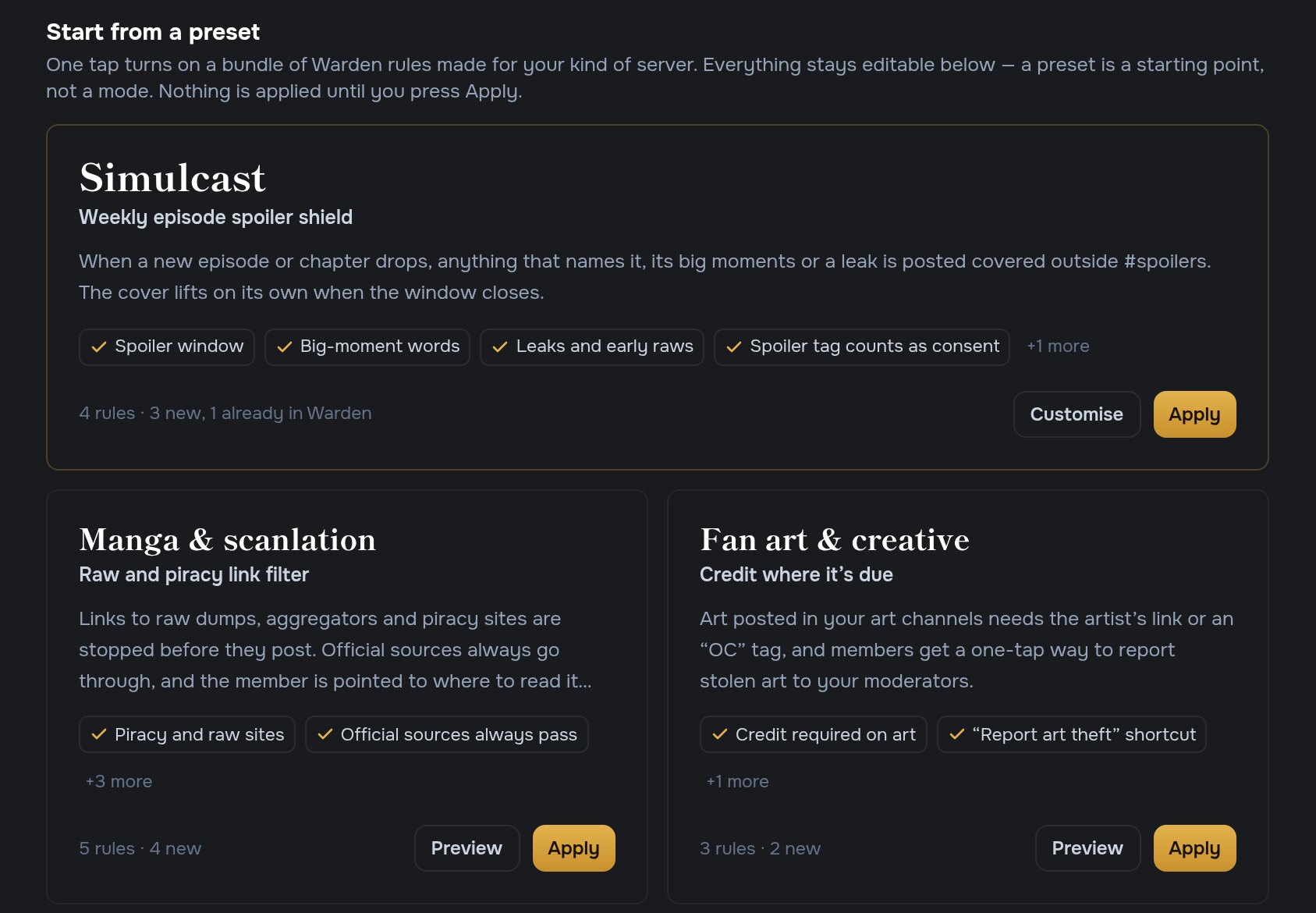
Nothing is applied until you press Apply, and every rule stays editable afterwards. A preset is a starting point, not a mode. Presets also stack: where two set the same rule, the stricter one wins, you see that before you apply, and any preset can be undone from the Mod Log.
Nothing is held back for review either. A spoiler is posted covered, a blocked link is refused with a note, and nothing waits in a queue.